How to Achieve Synchronous Followingin C#Here, Zmotion makes one C# routine that mainly shows synchronization and following.
(1) C# Commands of Synchronous Following
ZAux_Direct_MoveSync (handle, imode, synctime, syncposition, syncaxis, imaxaxises, piAxislist, pfDisancelist) |
Synchronous motion, the belt object follows. This is not interpolation, the trajectory can’t be ensured as the line. |
handle | Connection handle |
imode | Synchronization modes Ø imode = -1 – end mode, move to set absolute position, the belt axis is invalid. Ø imode = -2 – force to end, others are same as mode -1. Ø imode = -10 – 1st axis follows of following axes Ø imode = -20 – 2nd axis follows of following axes Ø imode = -30 – 3rd axis follows of following axes Ø imode = 0 + angle – with belt rotary angle Ø imode = 1000 + tableindex – axes tracking rates are saved into TABLE for 3D belt tracking when the belt is italic. |
synctime | The synchronization time (ms) |
syncposition | The belt axis position when the object on the belt is sensed. |
syncaxis | Belt axis No. |
imaxaxises | How many slave axes in total in synchronization motion. |
piAxislist | Following axes No. |
pfDisancelist | The slave axis’ absolution position when the belt object is sensed. |
|
ZAux_Direct_CycleRegist (handle, iaxis, imode, iTabStart, iTabNum) |
Latch positions continuously into TABLE |
imode | Ø 101 – 104: send absolution position to RegPos. Ø 114 – 117 & 123 – 124: send absolution position to RegPosB. Ø 133 – 134: send absolution position to RegPos, next time, switch trigger condition. Ø 135 – 136: send absolution position to RegPosB, next time, switch trigger condition. |
iTabeStart | Save continuous latched content into TABLE. |
iTabNum | How many TABLE occupied. |
|
ZAux_Direct_GetTable (handle, tabstart, numes, pfValue) |
Read data of TABLE. |
handle | Connection handle |
tablestart | TABLE starting No. |
numes | The number of reading |
pfValue | Data list |
|
For details, please refer to Zmotion PC Programming Manual. Download Add.:https://www.zmotionglobal.com/download_list_17.html Contact Us:https://www.zmotionglobal.com/contactus.html Including the C# library file. How to call the PC library file, please review lesson 2. |
(1) C# Program of Synchronous Following
A. UI Designment
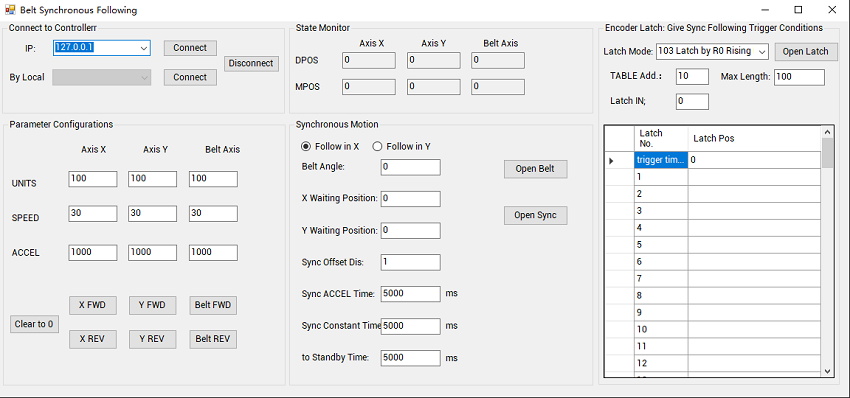
You can make it follow in X direction or Y direction.
If you need this C# routine full project, please contact us.
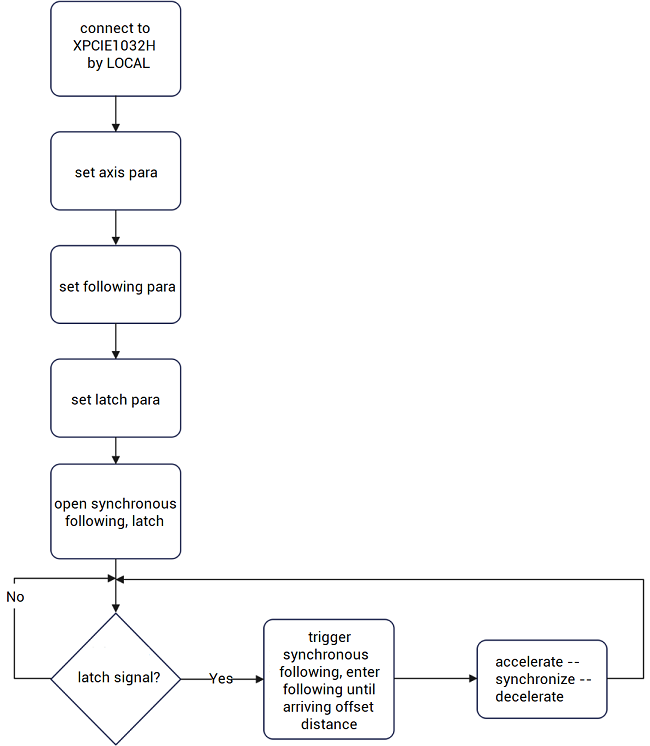
Step 1: connect
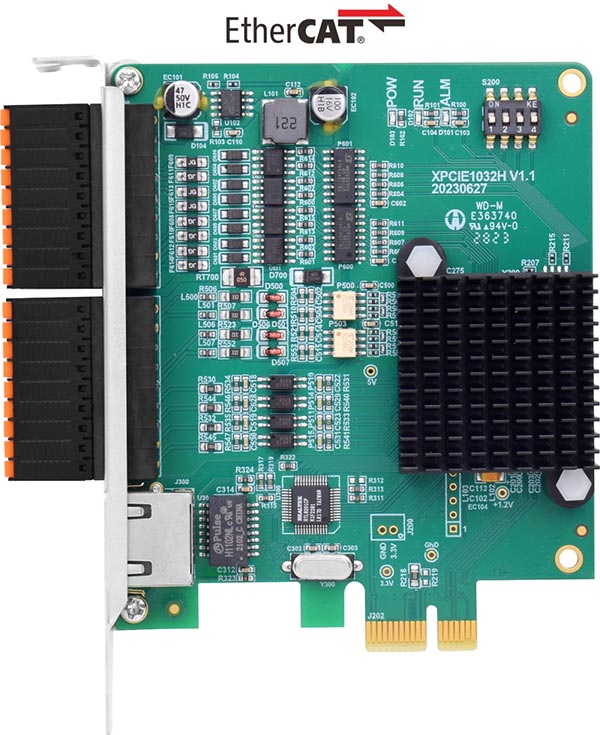
In Form1, call the interface “ZAux_FastOpen()” to connect to XPCIE1032H automatically while system is initializing.
Step 2: configure parameters
l Configure axis parameters
l Configure following parameters
l Configure latch parameters
Step 3: run, the timer gets latched position information
private void timer2_Tick(object sender, EventArgs e)
{
    int iret = 0;
    float[] MarkNum = new float[2];
    float[] RegistPos = new float[1000];

    //for (int i = 0; i < m_RegistCount; i++)
    //{
    //    this.DataGridView2.Rows[i].Cells[1].Value = "";
    //}

    m_RegistCount = 0;

    iret = zmcaux.ZAux_Direct_GetTable(G_CardHandle, Convert.ToInt32(Text_TabStart.Text), 1, MarkNum);                           //get latchh trigger times
    m_RegistCount = (int)MarkNum[0];
    this.DataGridView2.Rows[0].Cells[1].Value = m_RegistCount.ToString();

    //show in list
    if (m_RegistCount > m_RegistShow)                   //register numbers > shown
    {
        int iNum = m_RegistCount - m_RegistShow;

        iret = zmcaux.ZAux_Direct_GetTable(G_CardHandle, Convert.ToInt32(Text_TabStart.Text) + 1 + m_RegistShow, iNum, RegistPos);                        //get latch trigger times

        for (int i = 0; i < iNum; i++)
        {
            this.DataGridView2.Rows[m_RegistShow + i + 1].Cells[1].Value = RegistPos[i].ToString();
        }
        m_RegistShow = m_RegistCount;

    }
    else if (m_RegistCount < m_RegistShow)                             //latch in cycle, overflow
    {
        int iNum = Convert.ToInt32(Text_TabNum.Text) - m_RegistShow - 1;

        iret = zmcaux.ZAux_Direct_GetTable(G_CardHandle, Convert.ToInt32(Text_TabStart.Text) + 1 + m_RegistShow, iNum, RegistPos);                        //get latch trigger times
        for (int i = 0; i < iNum; i++)
        {
            this.DataGridView2.Rows[m_RegistShow + i + 1].Cells[1].Value = RegistPos[i].ToString();
        }
        m_RegistShow = 0;
    }
}
Step 3: synchronous following thread is triggered, execute the synchronous following.
public void SubMoveSync()
{
    int iret = 0;
    int[] iAxisList = new int[2] { 0, 1 };
    int[] iTime = new int[3];
    iTime[0] = Convert.ToInt32(TextAccTime.Text);
    iTime[1] = Convert.ToInt32(TextSyncTime.Text);
    iTime[2] = Convert.ToInt32(TextBackTime.Text);
    float[] fWaitPos = new float[2];
    fWaitPos[0] = Convert.ToSingle(TextXpos.Text);
    fWaitPos[1] = Convert.ToSingle(TextYpos.Text);
    float fOffPos = Convert.ToSingle(TextOffpos.Text);
    float fPdAxisPos = 0;       //current belt axis position
    float[] fMakrPos = new float[2];          //current processing product's latched encoder position
    int iMaxNum = Convert.ToInt32(Text_TabNum.Text);
    float imode = 0;
    if (radioBtnX.Checked)
    {
        imode = 0 + (float)(Convert.ToSingle(TextAngle.Text) / 180.0 * Math.PI);        //following in X direction
    }
    else
    {
        imode = 10 + (float)(Convert.ToSingle(TextAngle.Text) / 180.0 * Math.PI);       //following in Y direction
    }
    while (true)
    {
        if ((m_RegistCount != 0) && (iWorkCount < iMaxNum))              //latch, already latched numbers < total latched numbers
        {
            iret = zmcaux.ZAux_Direct_GetTable(G_CardHandle, Convert.ToInt32(Text_TabStart.Text) + 1 + iWorkCount, 1, fMakrPos);    //get the latch position currently ready for processing

        }
        else if (iWorkCount > iMaxNum)    //the latch coordinates have overflowed, and the data is saved before the latch
        {
            iWorkCount = iWorkCount - m_RegistCount;        //get the value from the next loop
            if (iWorkCount < m_RegistCount)
            {
                iret = zmcaux.ZAux_Direct_GetTable(G_CardHandle, Convert.ToInt32(Text_TabStart.Text) + 1 + iWorkCount, 1, fMakrPos);    //get the latch position currently ready for processing
            }
            else
            {
                continue;
            }
        }
        //latch is not triggered
        if (m_RegistCount == 0 || m_RegistCount == iWorkCount)
        {
            continue;
        }
        //wait for the conveyor belt position to move beyond the start following position
        do
        {
            iret = zmcaux.ZAux_Direct_GetMpos(G_CardHandle, 2, ref fPdAxisPos);            //get current encoder axis position

        } while (fPdAxisPos < fOffPos + fMakrPos[0]);
        iret = zmcaux.ZAux_Direct_MoveSync(G_CardHandle, imode, iTime[0], fMakrPos[0] + fOffPos, 2, 2, iAxisList, fWaitPos);      //for synchronous motion,accelerate

        iret = zmcaux.ZAux_Direct_MoveSync(G_CardHandle, imode, iTime[1], fMakrPos[0] + fOffPos, 2, 2, iAxisList, fWaitPos);      //for synchronous motion,constant motion time

        iret = zmcaux.ZAux_Direct_MoveSync(G_CardHandle, imode, iTime[2], 0, -1, 2, iAxisList, fWaitPos);      //after synchronization ends, return to standby position

        int Axisidle = 0;
        do
        {
            iret = zmcaux.ZAux_Direct_GetIfIdle(G_CardHandle, iAxisList[0], ref Axisidle);            //waiting for the spindle to complete following
        } while (Axisidle == 0);
        iWorkCount++;
    }
}
(2) C# Program Operation & Effect
Here, we select X direction, enter X direction following parameters (Y is same).
While running, we use our software RTSys “SCOPE” debugging tool to capture the motion situation (for details, please check lesson 6).
“trigger Latch by IN0 (ON) several times – send data – do synchronization & following – SCOPE collects the motion waveform”
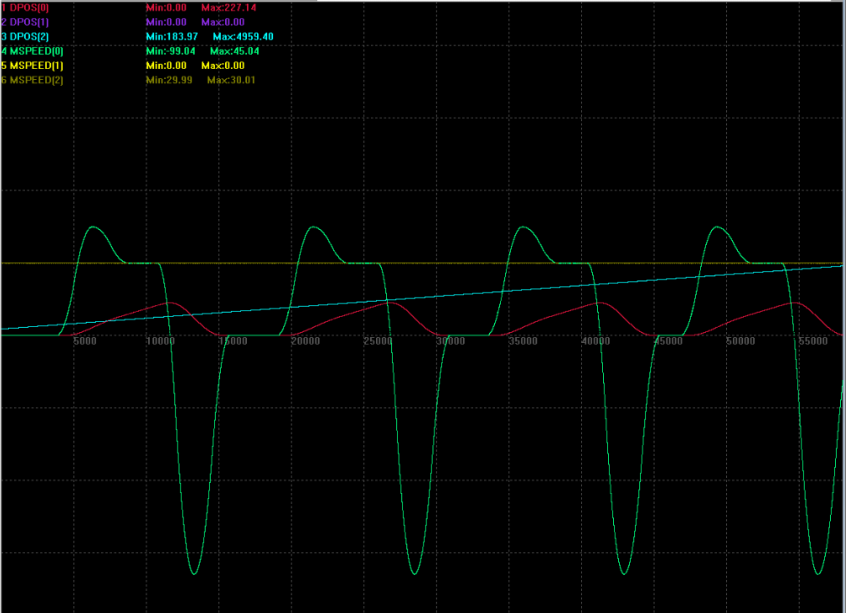
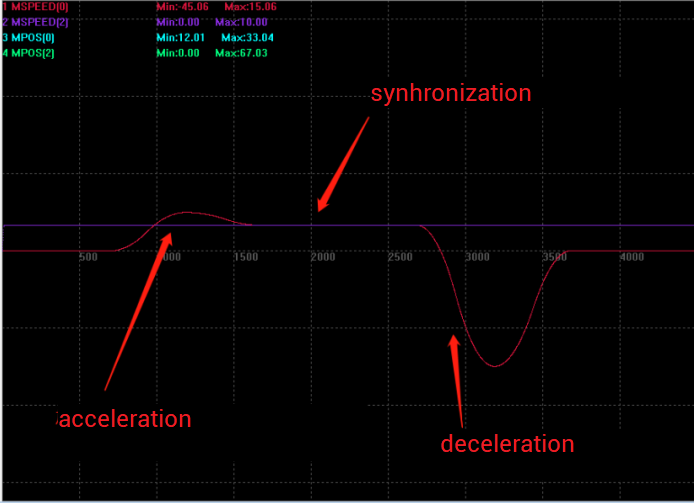
It can be seen the X completes synchronization within 5s, then it runs relatively with the belt axis at same speed within 2s, after following ends, returning within 5s.