C# Routine
Showing & Design
(1)
Speed Look-Ahead Related C# Command
ZAux_FastOpen – please check lesson 2 |
|
ZAux_Direct_SetCornerMode (handle, iaxis, iValue) |
handle |
Connection handle |
iaxis |
Axis No. |
imode |
modes
l
Bit 0 = value 1 – reserved.
l
Bit 1 = value 2 – automatic corner deceleration
l
Bit 2 = value 4 – reserved
l
Bit 3 = value 8 – automatic small-round speed limit
l
Bit 4 = value 16 – reserved
l
Bit 5 = value 32 – automatic chamfering |
|
ZAux_Direct_SetFullSpRadius (handle, iaxis, fValue) |
fValue |
Small round radius |
|
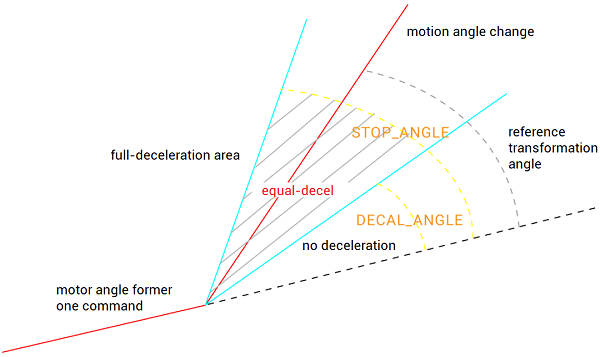
ZAux_Direct_SetStopAngle (handle, iaxis, pfValue) |
pfValue |
Stop deceleration angle |
|
ZAux_Direct_SetZsmooth (handle, iaxis, pfValue) |
pfValue |
Deceleration chamfering radius |
For details, please refer to Zmotion PC Programming Manual.
Download Add.:
https://www.zmotionglobal.com/download_list_17.html
Contact Us:
https://www.zmotionglobal.com/contactus.html
Including the C# library file. How to call the PC library file, please review lesson 2. |
(2)
Speed Look-Ahead C# Routine UI Design
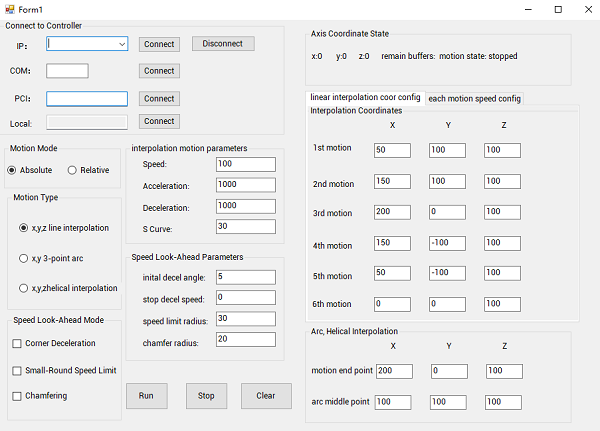
(3)
Speed Look-Ahead C# Routine Steps
This C# routine moves one continuous hexagon trajectory. You also a move needed motion by modifying each motion coordinates.
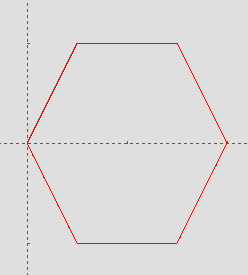
Step 1:
connect to XPCIE1032H motion control card
In Form 1, call the interface
“ZAux_FastOpen()”
to make it automatically connect to controller when the system initializes.
Step 2:
update axis state
Update controller axis state by timer, including current coordinates, remain buffer numbers, motion state, etc.
Step 3:
set parameters & move
Set axis parameters and look-ahead parameters, then run it according to set trajectory points. [for full codes, please contact us]
private void Button_start_Click(object sender, EventArgs e)    //run
{
    if (g_handle == (IntPtr)0)
    {
        MessageBox.Show("Not Connect to Controller!", "Note");
    }
    else
    {
        int RemainBuffer = 0;
        int CornerMode = 0;
        int[] axislist = { 0, 1, 2 };
        float[] poslist = { Convert.ToSingle(endpos1.Text), Convert.ToSingle(endpos2.Text), Convert.ToSingle(endpos3.Text) };
        float[] midlist = { Convert.ToSingle(midpos1.Text), Convert.ToSingle(midpos2.Text), Convert.ToSingle(midpos3.Text) };

        float[] firstlist = { Convert.ToSingle(firstpos1.Text), Convert.ToSingle(firstpos2.Text), Convert.ToSingle(firstpos3.Text) };
        float[] seclist = { Convert.ToSingle(secpos1.Text), Convert.ToSingle(secpos2.Text), Convert.ToSingle(secpos3.Text) };
        float[] thirdlist = { Convert.ToSingle(thirdpos1.Text), Convert.ToSingle(thirdpos2.Text), Convert.ToSingle(thirdpos3.Text) };
        float[] fourlist = { Convert.ToSingle(fourpos1.Text), Convert.ToSingle(fourpos2.Text), Convert.ToSingle(fourpos3.Text) };
        float[] fivelist = { Convert.ToSingle(fivepos1.Text), Convert.ToSingle(fivepos2.Text), Convert.ToSingle(fivepos3.Text) };
        float[] sixlist = { Convert.ToSingle(sixpos1.Text), Convert.ToSingle(sixpos2.Text), Convert.ToSingle(sixpos3.Text) };
        zmcaux.ZAux_Direct_Base(g_handle, 3, axislist); //select motion axes list
        zmcaux.ZAux_Direct_SetMerge(g_handle, axislist[0], 1);
        //for the interpolation motion, use spindle parameters (the first axis of BASE)
        zmcaux.ZAux_Direct_SetSpeed(g_handle, axislist[0], Convert.ToSingle(textBox_speed.Text));
        zmcaux.ZAux_Direct_SetAccel(g_handle, axislist[0], Convert.ToSingle(textBox_acc.Text));
        zmcaux.ZAux_Direct_SetDecel(g_handle, axislist[0], Convert.ToSingle(textBox_dec.Text));
        zmcaux.ZAux_Direct_SetSramp(g_handle, axislist[0], Convert.ToSingle(textBox_sramp.Text));
        if (checkBox1.Checked == true)
            CornerMode += 2;
        if (checkBox2.Checked == true)
            CornerMode += 8;
        if (checkBox3.Checked == true)
            CornerMode += 32;
        //set look-ahead mode and corresponding parameters
        zmcaux.ZAux_Direct_SetCornerMode(g_handle, axislist[0], CornerMode);
        zmcaux.ZAux_Direct_SetDecelAngle(g_handle, axislist[0], Convert.ToSingle(textBox_DecelAngle.Text));
        zmcaux.ZAux_Direct_SetStopAngle(g_handle, axislist[0], Convert.ToSingle(textBox_StopAngle.Text));
        zmcaux.ZAux_Direct_SetFullSpRadius(g_handle, axislist[0], Convert.ToSingle(textBox_SpRadius.Text));
        zmcaux.ZAux_Direct_SetZsmooth(g_handle, axislist[0], Convert.ToSingle(textBox_ZSmooth.Text));
        zmcaux.ZAux_Direct_SetForceSpeed(g_handle, axislist[0], Convert.ToSingle(textBox_speed.Text));
......
Step 4:
stop motion
Press stop button to call the stop interface
“ZAux_Direct_Single_Cancel()”
to make it end.
Step 5:
clear coordinates
Press clear button to call the coordinate clearing interface
“ZAux_Direct_SetDpos()”
to reset the current motion coordinates.
C# Routine
Operation & Effect
In this C#, let’s test 3 modes that were mentioned above: run the motion in C# & check running effect (capture data) by RTSys “SCOPE” tool (for RTSys debugging information, please review lesson 6).
Note: for real operation and scope configurations, please check this lesson’s video.
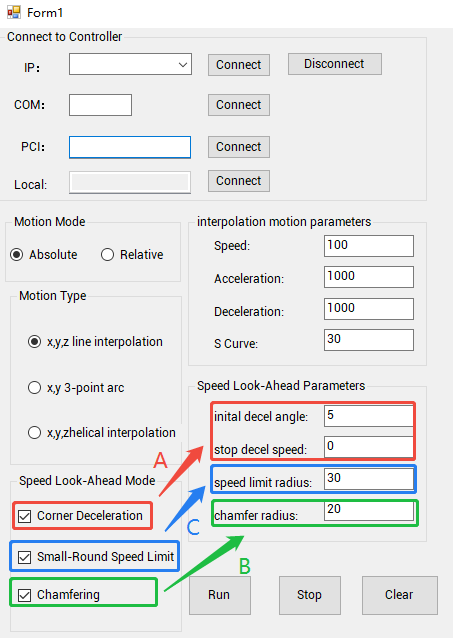
A.
Test “Corner Deceleration”
--Corner Deceleration is OFF--
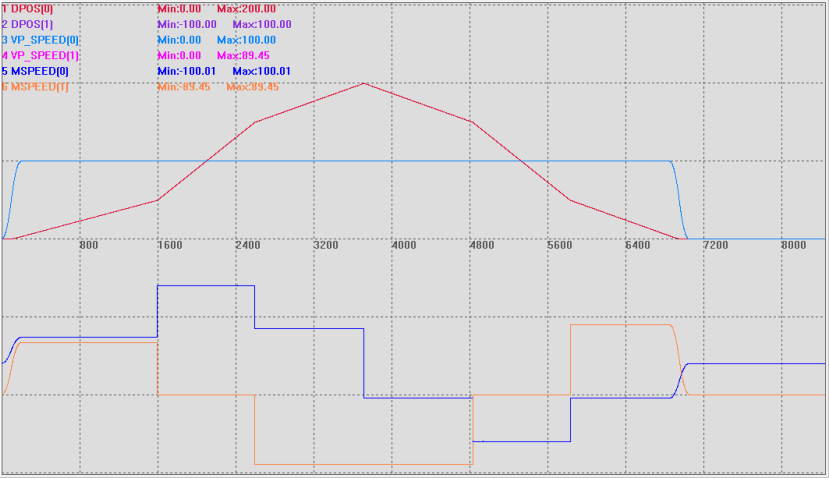
--Corner Deceleration is ON (deceleration condition is met)--
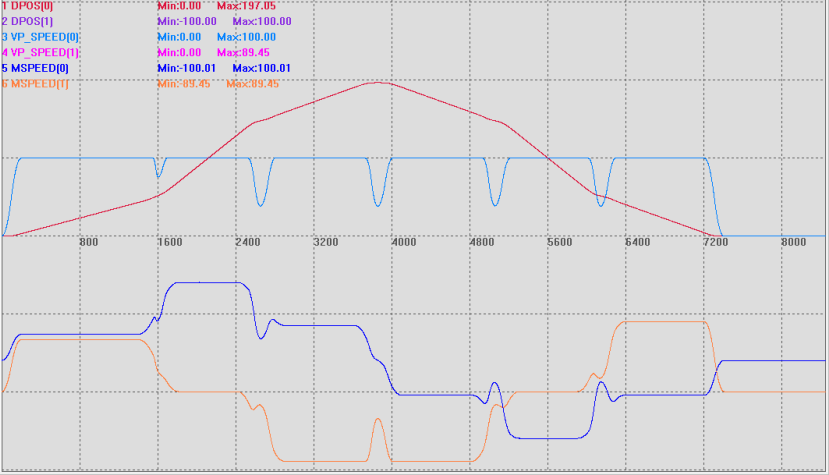
--Chamfering is OFF--
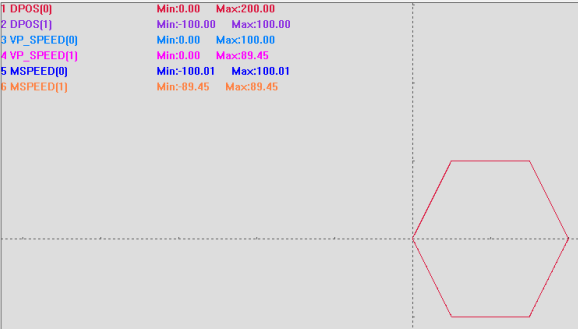
--Chamfering is ON--
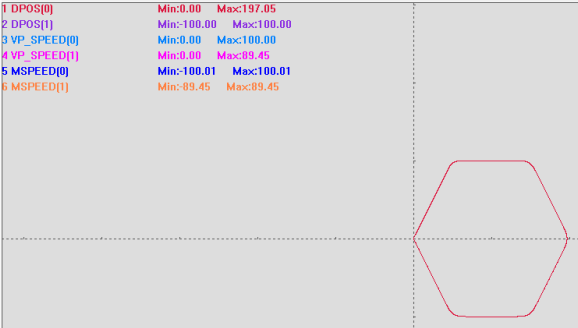
C.
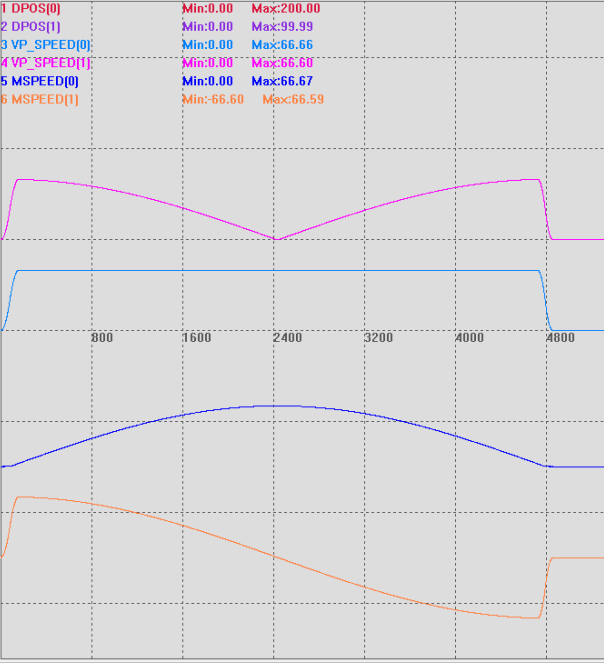
Test “Small-Round Speed Limit”
--Small-Round Speed Limit is OFF--
Small-circle radius 100 > speed limit radius 30, the speed is normal, meeting the peak value.
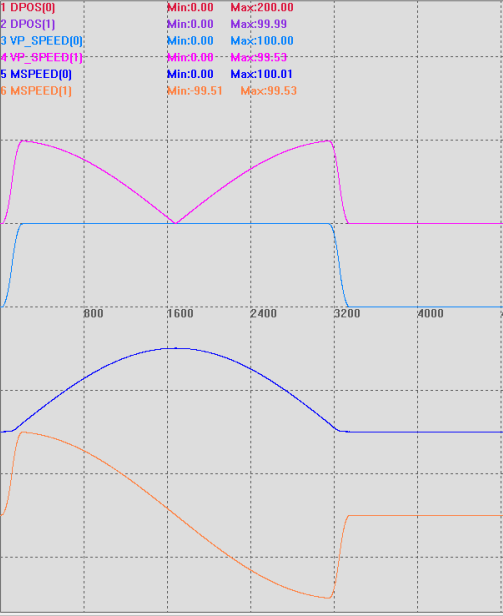
--Small-Round Speed Limit is ON--
Small-circle radius 100 < speed limit radius 150, the speed is limited.
<b