Bring Values and Sucesses To Our Customers

Home / Support and services / Technical Support

Technical support

Technical Support

Zmotion EtherCAT PCIE Card XPCIE1032H for You (12) | C# PT/PVT Motion Mode

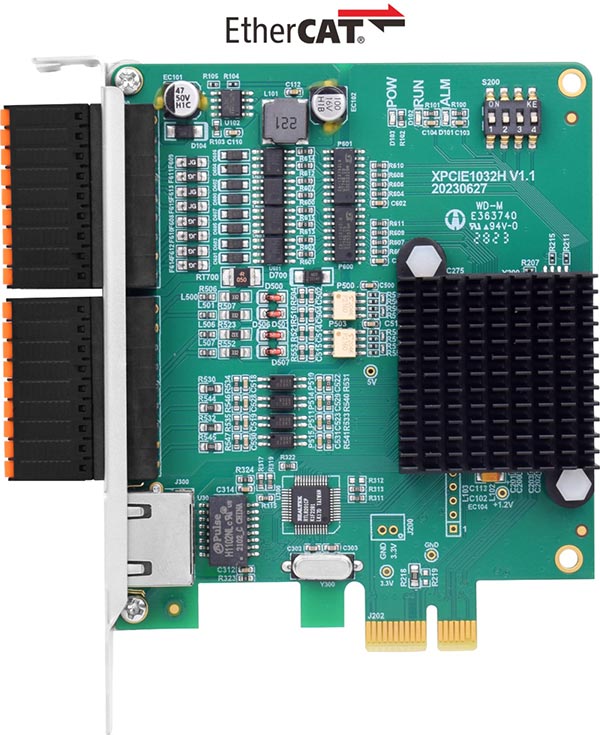
XPCIE1032H is one  EtherCAT PCI Express motion control card developed by Zmotion Technology.

*XPCIE1032H Introduction Video*:https://youtu.be/B1ktSxIRa44

*XPCIIE1032H Lesson 1- Lesson 11*: https://youtu.be/0C96S5_hVf0 

*XPCIE1032H Lesson 12 Video:  https://youtu.be/R8x689ya9oc  

1.jpg

And one  software kernel is built.

--XPCIE1032H Card & MotionRT7 Soft Kernel--

P 1D/2D/3D PSO (high-speed hardware position comparison output): suit to vision fly-shooting, precise dispensing, laser energy control, etc.

P in PC Windows development, it can achieve real-time, and the instruction interaction speed is faster 10 times than traditional PCI / PCIe.

Average Value

C++ LOCAL

C# LOCAL

Traditional PCI / PCIe

PLC EtherNET

Period of one command reading with 1W times

4.70us

5.3us

64us

500us-10ms

Period of one command reading with 10W times

3.90us

5.7us

65us

500us-10ms

Period of multi-command reading with 1W times

6.20us

8.85us

472us

500us-10ms

Period of multi-command reading with 10W times

5.50us

8.37us

471us

500us-10ms

This lesson mainly shows how to use PT / PVT motion algorithms for moving the motor to required distance in one certain time with planned speed.

[PT / PVT Motion Introduction]

[C# Routine Introduction & Codes]

[C# PT Modes Running]

[C# PVT Modes Running]


( ZMOTION )
PT / PVT Motion Introduction

(1)    What is PV Motion

It drives the motor to move configured distance in a certain time.

--PT Algorithm--

The PT algorithm calculates a suitable velocity curve between the user-defined "position and time" points. That is, the PT algorithm ensures that the trajectory calculation of the control card meets each known point and time. For the segment speed, it is simply calculated by the difference between position and time.

--PT C# Command--

* Relative PT Motion: ZAux_Direct_MultiMovePt

* Absolute PT Motion: ZAux_Direct_MultiMovePtAbs

--PT Motion Applications--

PT algorithm is mainly used for the motion that is with  closer distance / low speed.

In a word, it is popular in  low-performance motion system, because it is a simple algorithm (small calculation, fast speed). If the space between points is too large, each acceleration will be not continuous, then the motion will be very rough. Therefore, recommend the span is within several sampling points.


(2)    What is PVT Motion

It drives the motor to move configured distance in one certain time with speed planning, and the end speed can be specified. In small segment motion, the speed will be automatically planned according to former speed and end speed, making it continuous.

--PVT Algorithm--

The PVT algorithm calculates a suitable Jerk parameter (non-constant acceleration) between the user-defined "position & speed & time" points. That is, the PVT algorithm ensures that the trajectory calculation of the control card meets each known point and time.

--PVT C# Command--

* Relative PVT Motion: ZAux_Direct_MultiMovePvt

* Absolute PVT Motion: ZAux_Direct_MultiMovePvtAbs

--PT Motion Applications--

PVT algorithm is mainly used for  smoothing trajectory and tracking trajectory. And the space between points can be small or big (for complex path, they should be close, for simple path, they can be far). What’s more, the point can be specified manually, but it is hard to set suitable speed for each point.


  (3)    PV / PVT Motion Descriptions

a.   Drive motor move configured distance in one certain time.

b. Speed, acceleration, deceleration are planned according to set time and position.  Please remember to configure quick deceleration / deceleration, otherwise it will not stop by stop command while encountering abnormal situation.

c. Generally, PC will calculate corresponding coordinates in each period, then send to the motion controller.

d.  Moving speed = (motion distance / time length) * 1000 units / ms

e.  Don’t move long distance in a short time, the pulse frequency will be too high, you can move several small segments.


( ZMOTION )
C# Routine Introduction & Codes

(1)    PT / PVT C# Commands

* ZAux_Direct_MultiMovePt

* ZAux_Direct_MultiMovePtAbs

* ZAux_Direct_MultiMovePvt

* ZAux_Direct_MultiMovePvtAbs

For details, please refer to Zmotion PC Programming Manual.

Download Add.:https://www.zmotionglobal.com/download_list_17.html

Contact Us:https://www.zmotionglobal.com/contactus.html

Including the C# library file. How to call the PC library file, please review lesson 2 .


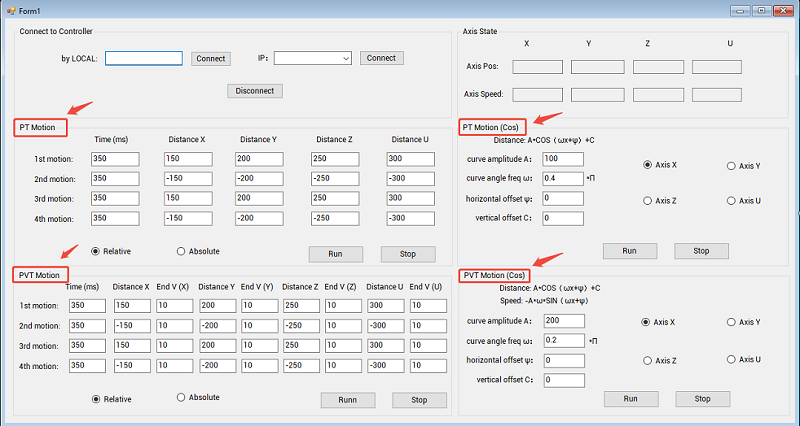
(2)    PT / PVT C# Routine UI

2.png


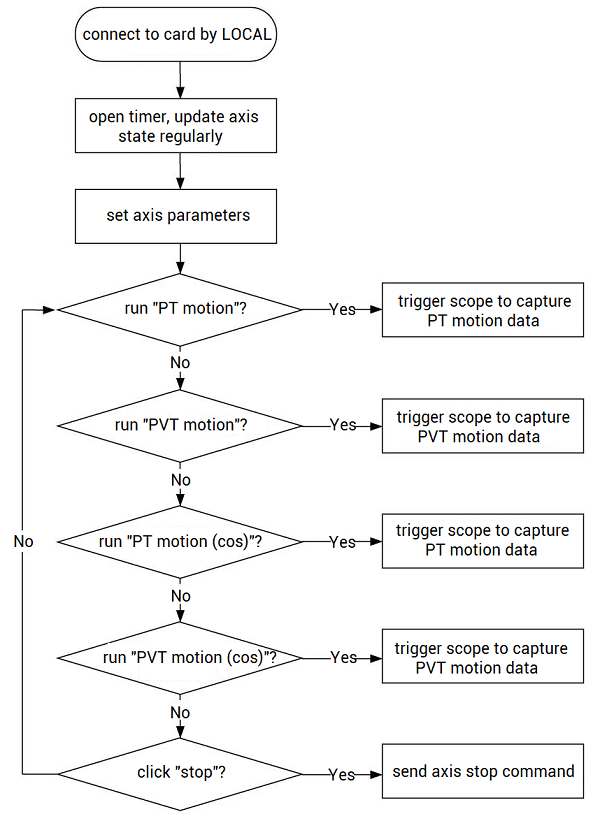
(3)    PT / PVT C# Routine Introduction

3.png

Step 1: connect to XPCIE1032H card

Through C#, connect to XPCIE1032H card by LOCAL method at first.

Step 2: set axis parameters

After connected, write needed axis parameters that will be called while moving corresponding motions.

private void C_Move_Axis_TextChanged()
{
    float DposValue = 0;
    float MposValue = 0;
    int AType = 1;      //set axis type
    int UnitValue = 100; //set pulse amount
    int ret = 0;
    for (int i = 0; i < 4; i++)
    {
        ret += zmcaux.ZAux_Direct_SetAtype(g_handle, i, AType);     //set axis type
        ret += zmcaux.ZAux_Direct_SetUnits(g_handle, i, UnitValue); // set pulse amount
        ret += zmcaux.ZAux_Direct_SetFastDec(g_handle, i, 10000);  //set rapid deceleration
        ret += zmcaux.ZAux_Direct_SetDpos(g_handle, i, DposValue); //set axis DPOS as 0
        ret += zmcaux.ZAux_Direct_SetMpos(g_handle, i, MposValue); //set axis MPOS as 0
    }
}


Step 3: move

For this C# example, there are 4 kinds of motions:

a.  PT motion (no planned speed & trajectory)

b.  PT motion (cosine function)

c.  PVT motion (no planned speed & trajectory)

d. PVT motion (cosine function)

Please see next chapter for running details.


( ZMOTION )
C# PT  Modes Running

(1)    PT Motion (no planned speed & trajectory)

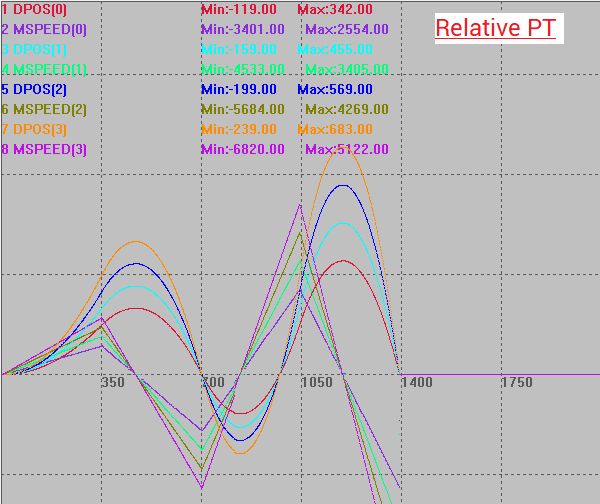
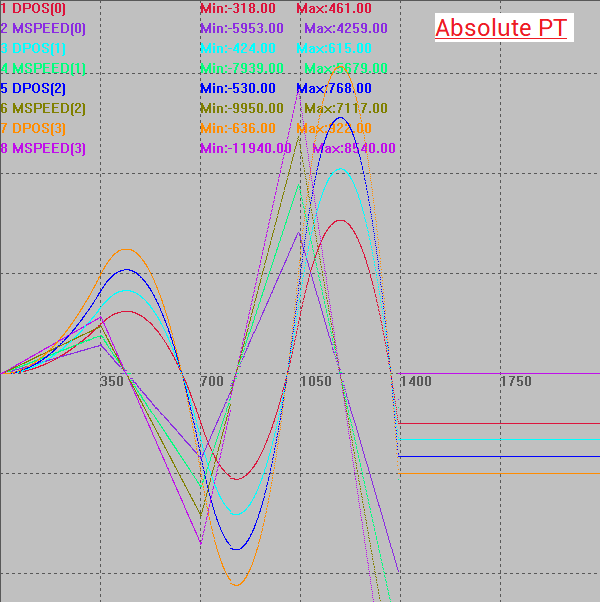
Usually, PT motion is used together with trigonometric functions. If PT motion is used directly, the motion and speed curve will not smooth.

Step 1: enter PT motion parameters, and select relative PT or absolute PT.

Step 2: open RTSys, connect RTSys with XPCIE1032H card by LOCAL.

“lesson 6 shows how to use RTSys debug C# program”.

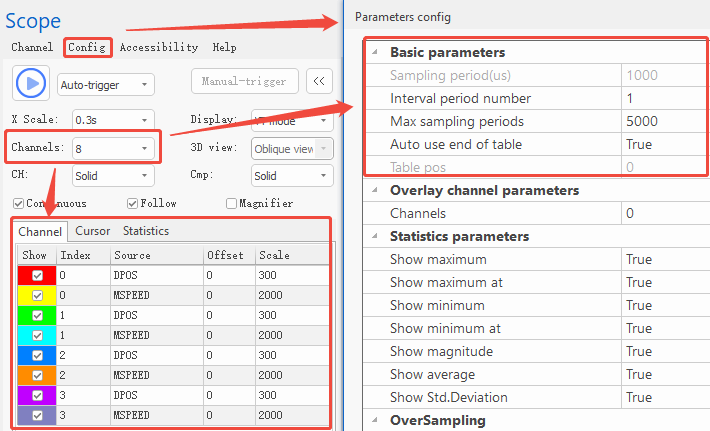
Step 3: open  RTSys “SCOPE” tool, set 8 channels, and set corresponding parameters as below shown, then start oscilloscope.
4.png

Step 4: in C#, open PT motion. When it starts to move, corresponding data will be capture by SCOPE automatically because there is trigger function in program.
5.png

6.png


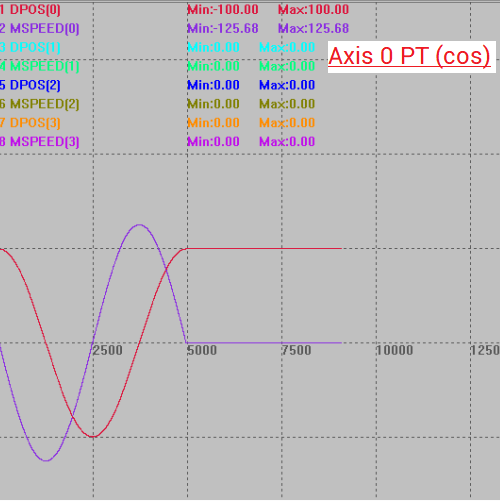
(2)    PT Motion (cosine function)

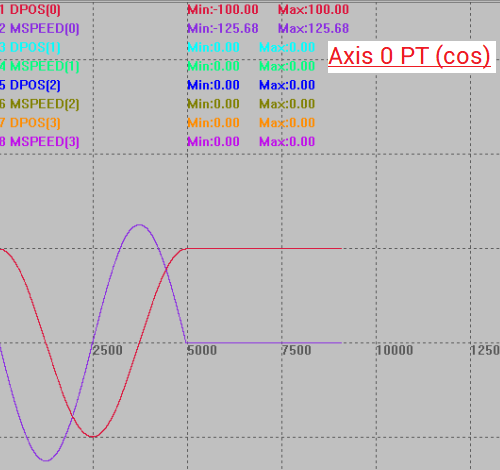
Usually, PT motion is used together with trigonometric functions.

Here, take the example of cosine.

A   * COS (ωx + ψ) + C

A

Amplitude: determine the peak and valley values of   the curve

ω

Angular frequency: affect the periodicity of the   curve, period T = 2π/ω

ψ

Phase angle: the horizontal offset of the curve

C

Constant: shift the entire curve up and down

Step 1: enter PT cosine motion parameters, and select motion axis.

Step 2: open  RTSys, connect them, and open SCOPE tool, set parameters (same as above)

Step 3: in C#, open PT cosine motion. Corresponding curves are captured.
7.png

Note:  even though the scope curve starting point is 100, the real axis starts from 0. In this way (set the motion curve starting point as peak value), it is clearer.


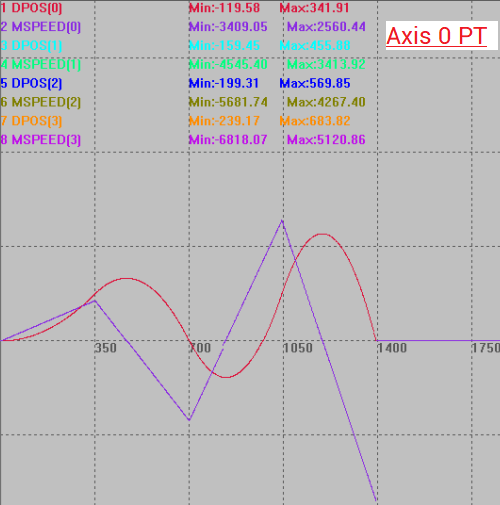
(3)    PT VS PT (cos)
8.png

9.png

It can be seen PT motion curves are not smoother than PT cosine motion.


( ZMOTION )
C# PVT  Modes Running

(1)    PT Motion (no planned speed & trajectory)

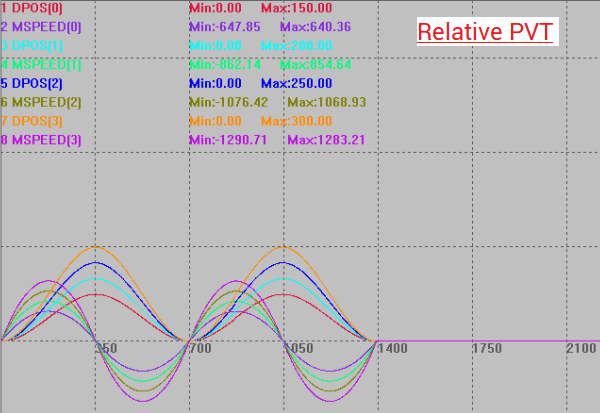
Same as PT, if PVT motion is used directly, the motion and speed curve will not smooth.

Step 1: enter PVT motion parameters, and select relative PT or absolute PT.

Step 2: open RTSys, connect them, and open SCOPE tool, set parameters (same as above)

Step 3: in C#, open PVT motion. Corresponding curves are captured.
10.png

11.png


(2)    PVT Motion (cosine function)

Usually, PVT motion is used together with trigonometric functions.

And  the difference between PT and PVT is the end speed, so as long as the real-time speed of the PVT motion is used as the end speed, then the motion curves of PVT motion (cosine) and PT motion (cosine) are the same. The real-time speed of the motion can be derived from the motion distance.

Here, take the example of cosine.

*motion distance: A * COS (ωx + ψ) + C

*motion end speed: -A * ω * SIN (ωx + ψ)

Step 1: enter PVT cosine motion parameters, and select motion axis.

Step 2: open RTSys, connect them, and open SCOPE tool, set parameters.

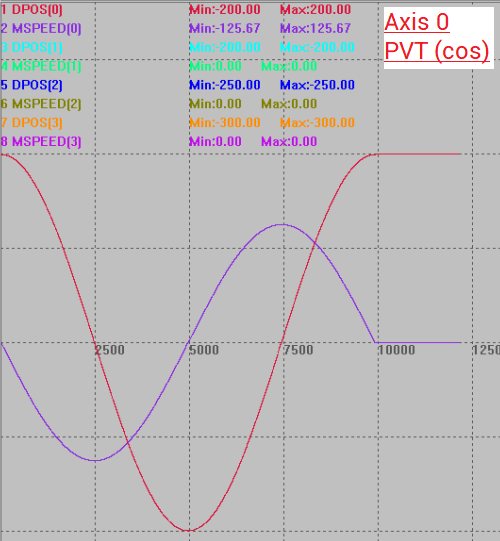
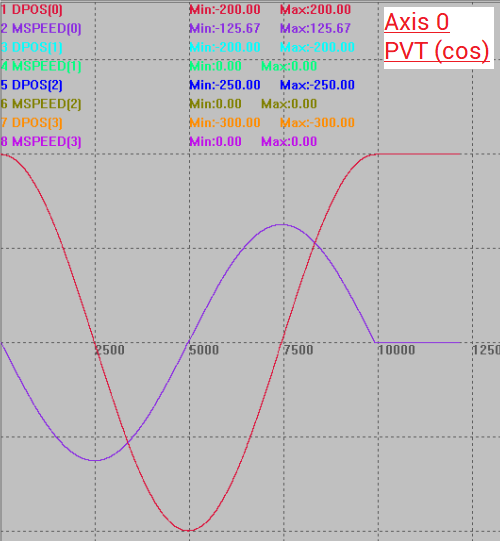
Step 3: in C#, open PVT cosine motion. Corresponding curves are captured.
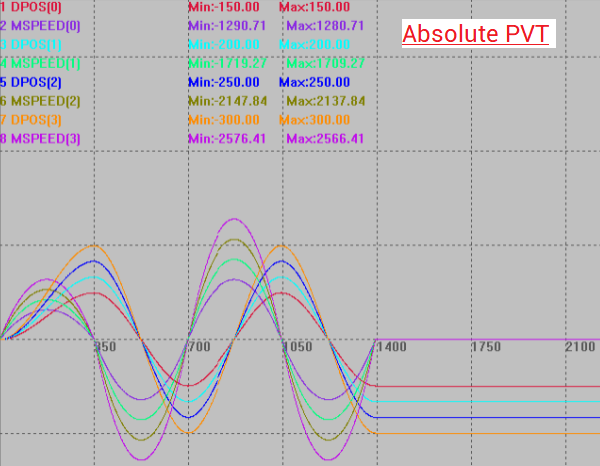
12.png

Note: even though the scope curve starting point is 200, the real axis starts from 0. In this way (set the motion curve starting point as peak value), it is clearer.


(3)    PVT VS PVT (cos)
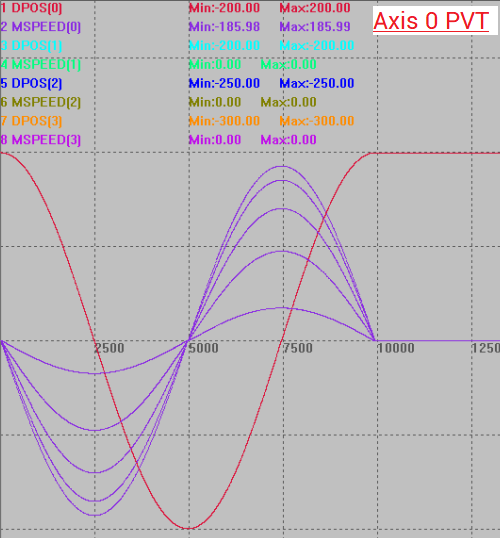
13.png

14.png

It can be seen PVT motion curves are not soft, it seems there are 5 speed curves. For PVT cosine curve, it is normal.

Copyright © 2013-2024 Shenzhen Zmotion Technology Co.,Ltd Design by Zmotion    粤ICP备13037187号 Motion Controller-Motion Control Card

Contact Us-Youtube