ZDevelop Interfact Overview

How to link ZMOTION motion controller and ZDevelop:
1.Click "controller"-"Connect" on ZDevelop menue, conncetion interface pops as follow:
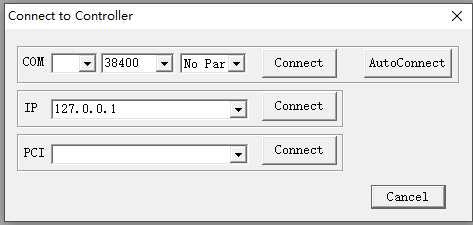
2.Serial port or Ethernet connection
(1)By serial port: click "autoconnect", ZDevelop will detect and find the first available PC serial port that already linked to motion controller,then link itself to controller.
If controller is linked to PC by USB drive, USB will generate a mapped virtual serial port number, select it and connect.
Serial port parameters are also selectable, default value is: baud rate:38400,data bit:8,stop bit:1,check bit:none
(2)By Ethernet
Select the IP of controller,then click "connect",default IP of controller is 192.168.0.11.
In order to access IP of connected motion controller,first three network segments of PC should be set same as motion controller.
After connected,if need to change IP of motion controller in order to meet needs of Internet devices,please use ZBasic Instrution:IP_ADDRESS.

Link to Simulator:ZSimulator
ZDevelop supports simulator function, it is convenient for project programming or debugging when motion controller is not available.
Click "controller"-"Connect to simulator " on ZDevelop menue, then simulator is connected, IP of simulator is 127.0.0.1.

In simulator mode,IOs,encoders etc,are shown on interface as follow,click "display" on it,HMI interface will pop.

Use "help" to access instrutions details
Click "help" ZDevelop,we will see help menue,programming instructions of ZBasic,ZPlc,ZHmi can be accessed then.

Language Switch
ZDevelop supports English and Chinese only at present,click "view","Language" to choose languages,every time need to restart ZDvelop to make selected lanuage effective.






 Features

 Parameters

 System Architecture

 Download
 Integration Development Environment of ZBASIC + PLC + HMI.